> ## Documentation Index
> Fetch the complete documentation index at: https://baseten-philip-copy-0226.mintlify.site/llms.txt
> Use this file to discover all available pages before exploring further.
# User guide
> Get up and running quickly with Truss' developer workflow
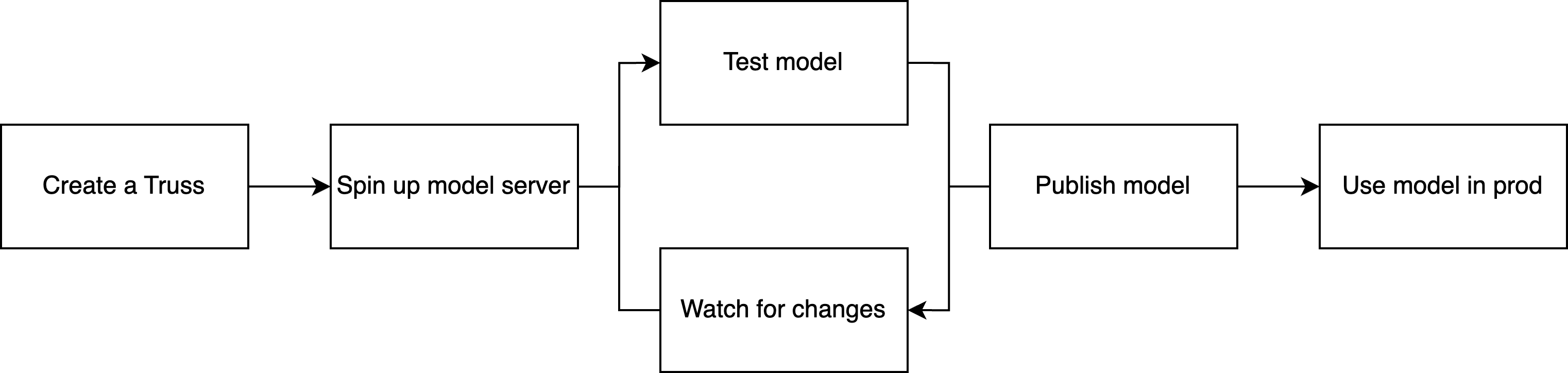
We built Truss because we were frustrated with the long feedback loops in ML model deployment. When you have to wait for your server to rebuild every time you make a change, iteration is painful.
Meanwhile, web developers have enjoyed live reload workflows for years, where changes are patched onto a running server and available almost instantly.
With Truss, you get the same live reload workflow for serving ML models.
 ## Create a Truss
```sh
truss init TARGET_DIRECTORY
```
A Truss is an abstraction for a model server. But more literally, it's a set of files. Running `truss init` creates those files in a target directory.
To package a model with Truss, follow the [quickstart](/quickstart), a [step-by-step example](/examples), or an [example from GitHub](https://github.com/basetenlabs/truss-examples/).
See the CLI reference for more information on [truss init](/reference/cli/init).
## Spin up model server
```sh
truss push
```
A model server takes requests, passes them through an ML model, and returns the model's output. When you're ready to start testing your Truss, use `truss push` to spin up a model server with your model and config.
See the CLI reference for more information on [truss init](/reference/cli/push).
## Test the model
```sh
truss predict
```
Once your model server is live, you can invoke your model with `truss predict`.
See the CLI reference for more information on [truss predict](/reference/cli/predict).
## Watch for changes
Run the `truss watch` command in a new terminal tab in the same working directory, as you'll need to leave it running while you work.
```sh
truss watch
```
When you make a change with `truss watch` running, it will automatically attempt to patch that change onto the model server. Most changes to `model.py` and `config.yaml` can be patched.
The following changes should not be made in a live reload workflow:
* Updates to `resources` in `config.yaml`, which must be set before the first `truss push`
* Changes to the `model_name` in `config.yaml`. Changing the model name requires a new `truss push` to create a new model server.
See the CLI reference for more information on [truss watch](/reference/cli/watch).
## Publish your model
Once you're happy with your model, stop `truss watch` and run:
```sh
truss push --publish
```
This will re-build your model server on production infrastructure.
## Use model in production
To invoke the published model, run:
```sh
truss predict --published
```
With [Baseten](https://baseten.co) as your [remote host](/remotes/baseten), your model is served behind [autoscaling infrastructure](https://docs.baseten.co/managing-models/resources) and is [available via an API endpoint](https://docs.baseten.co/building-with-models/invoke).
## Create a Truss
```sh
truss init TARGET_DIRECTORY
```
A Truss is an abstraction for a model server. But more literally, it's a set of files. Running `truss init` creates those files in a target directory.
To package a model with Truss, follow the [quickstart](/quickstart), a [step-by-step example](/examples), or an [example from GitHub](https://github.com/basetenlabs/truss-examples/).
See the CLI reference for more information on [truss init](/reference/cli/init).
## Spin up model server
```sh
truss push
```
A model server takes requests, passes them through an ML model, and returns the model's output. When you're ready to start testing your Truss, use `truss push` to spin up a model server with your model and config.
See the CLI reference for more information on [truss init](/reference/cli/push).
## Test the model
```sh
truss predict
```
Once your model server is live, you can invoke your model with `truss predict`.
See the CLI reference for more information on [truss predict](/reference/cli/predict).
## Watch for changes
Run the `truss watch` command in a new terminal tab in the same working directory, as you'll need to leave it running while you work.
```sh
truss watch
```
When you make a change with `truss watch` running, it will automatically attempt to patch that change onto the model server. Most changes to `model.py` and `config.yaml` can be patched.
The following changes should not be made in a live reload workflow:
* Updates to `resources` in `config.yaml`, which must be set before the first `truss push`
* Changes to the `model_name` in `config.yaml`. Changing the model name requires a new `truss push` to create a new model server.
See the CLI reference for more information on [truss watch](/reference/cli/watch).
## Publish your model
Once you're happy with your model, stop `truss watch` and run:
```sh
truss push --publish
```
This will re-build your model server on production infrastructure.
## Use model in production
To invoke the published model, run:
```sh
truss predict --published
```
With [Baseten](https://baseten.co) as your [remote host](/remotes/baseten), your model is served behind [autoscaling infrastructure](https://docs.baseten.co/managing-models/resources) and is [available via an API endpoint](https://docs.baseten.co/building-with-models/invoke).